I moved into a new house and my phone stopped working properly in half of it. I write about cell phones here and test a lot of carriers, and this is the first time one feature genuinely bailed me out.
The Takeaway
US Mobile lets you move an existing line to a different underlying network from inside the app. No port, no new number, no second account. I've done it three times at this address, and the surprise was that the network with the stronger signal turned out to be about 7x slower in the room where I needed it most. I ended up back on Dark Star.
Why My Signal Died After the Move
My old place was fine. In the new one, calls started dropping in the room I use most, and the first floor was worse than the second.
I was on Warp, which third parties peg as US Mobile's Verizon-backed network (more on that mapping below). I never measured it, so I won't pretend I have numbers. What I have is the ordinary experience of standing by a window to finish a call.
Coverage maps didn't help. The FCC's own mobile broadband map says its data reflects service "outdoors or in a moving vehicle, but not indoors." Carrier maps are the same kind of estimate, which is why the only reading that counts is the one you take in your own hallway.
What Network Switching Actually Is
US Mobile resells three networks. Most MVNOs resell one, and if that one is weak at your address, your only fix is to leave.
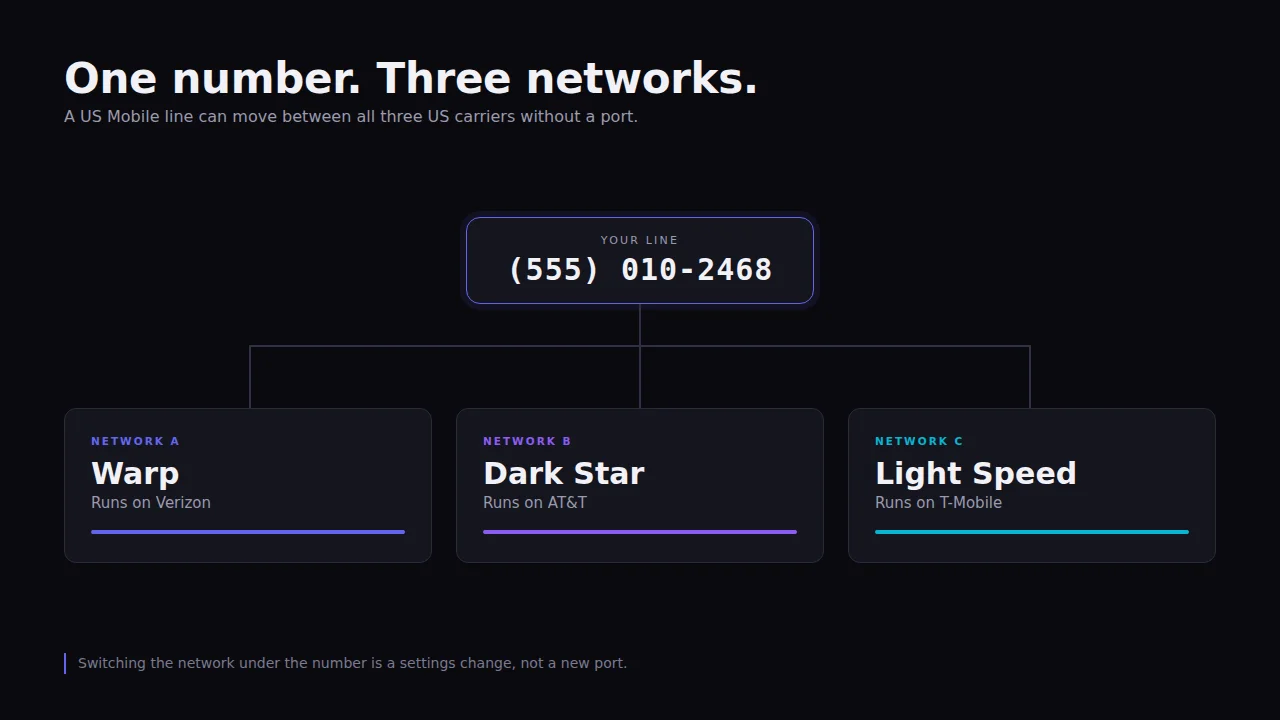
US Mobile's version lets you change which network your line rides on while keeping the line. Reviewers still call it Teleport or Teleportal; the app now labels it Switch Network, and the official switch networks help page uses the newer name.
All three times I did it, my number, my plan, and my billing date came through untouched. What changes is the tower your phone talks to.
Which US Mobile Network Is Which
US Mobile never names the carriers on its own site, which is almost certainly a contract thing. The mapping is widely reported by third parties, including WhistleOut and Wikipedia.
- Warp rides Verizon.
- Dark Star rides AT&T.
- Light Speed rides T-Mobile.
The network you land on changes more than your bars. Per US Mobile's unlimited plans and data priority pages, high-speed data allowances and hotspot caps are listed per network, so the same plan name can give you a different allowance depending on where your line sits.
Tower priority moves too. Per that same data priority page, Light Speed runs QCI 7 on every plan, while Warp and Dark Star give Premium lines QCI 8. QCI is the queue position your data gets when a tower is busy, and a lower number means you're served ahead of higher-numbered traffic during congestion.
Read the plan page for the network, not the plan
Two people on the same US Mobile plan can have different data allowances, different hotspot caps, and different congestion behavior purely because their lines sit on different networks. Check the allowance for the network you're switching to before you switch.
How to Switch Networks, Step by Step
In the app the path is Lines, then your line, then Line Settings, then Plan Management, then Switch Network, then pick your network, then choose eSIM or a physical SIM. On the web it's My Lines, then Line Settings, then Line Management, then Switch Network.
You'll need two-factor authentication turned on and a Wi-Fi connection, both per US Mobile's help page.
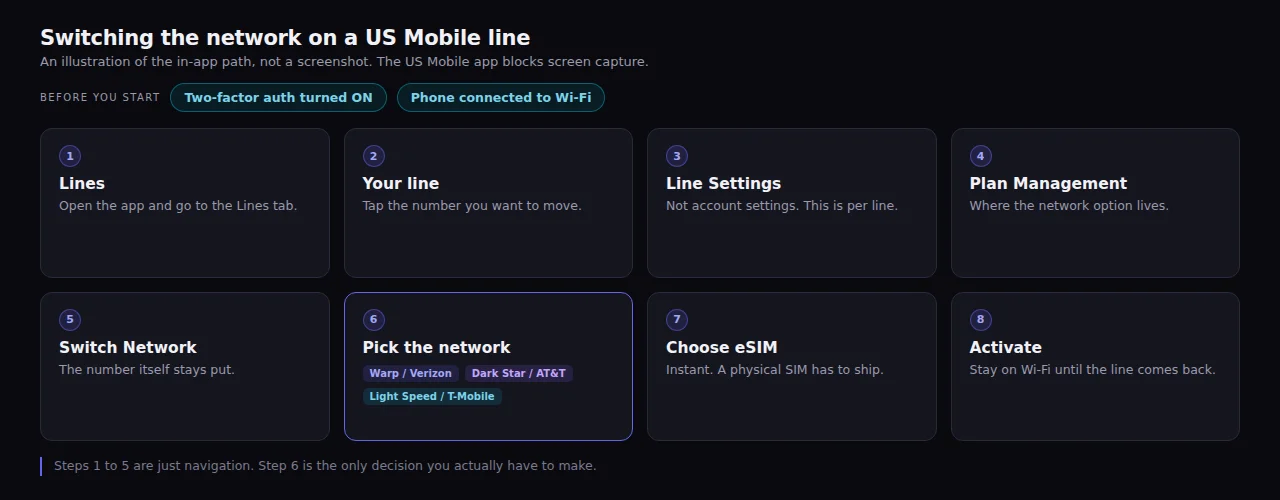
Everything before step 6 is just navigation, so the only real decision is which network you pick.
I can't show you app screenshots for this. Every capture I tried came back black, which plenty of banking and account apps do on purpose, so you'll have to trust the diagram and your own thumbs.
Pick eSIM if your phone supports it. eSIM switches land almost immediately. A physical SIM has to ship, and US Mobile quotes 4 to 6 business days, which turns a ten-minute experiment into a week-long one.
Try US Mobile on My Referral
Port your number in once with my link, then switch networks in the app for free whenever your signal changes. The $30 credit needs that number transfer, and we both get it. Full disclosure: this is my referral link, so I get $30 too.
How to Test Your Own Address
Bars are a marketing graphic. The number you want is RSRP, measured in dBm, and every phone will show it if you ask correctly.
- iPhone: dial
*3001#12345#*to open field test mode, then look forrsrp. - Pixel: Settings, then About phone, then SIM status.
- Samsung: dial
*#0011#.
RSRP is a negative number and closer to zero is better. Better than -90 is a good signal, -100 to -110 is weak, and -110 or lower is where calls start failing.
Then run a speed test anyway. I use fast.com, and the whole point of this article is that the RSRP reading and the speed test told me different stories.
Take readings in the worst room, not the best one. Mine were the back of the first floor and the back of the second. A reading by the front window flatters every network equally and tells you nothing about the call you're going to drop.
Do it twice on different days. Networks have bad afternoons, and one bad sample is how people end up switching for no reason.
My Results
I tested Dark Star and Light Speed at three spots in the house, then ran fast.com in the worst room and re-confirmed it on a second day.
| Where | Dark Star (AT&T) | Light Speed (T-Mobile) |
|---|---|---|
| 2nd floor, front of house | -109 dBm | -108 dBm |
| 2nd floor, back of house | -113 dBm | -115 dBm |
| 1st floor, worst room | -117 to -121 dBm | -115 dBm |
| Worst-room download | 6.2 Mbps | 880 Kbps |
Warp has no column here because I switched off it before I started measuring, so I have the lived experience of it and none of the numbers.
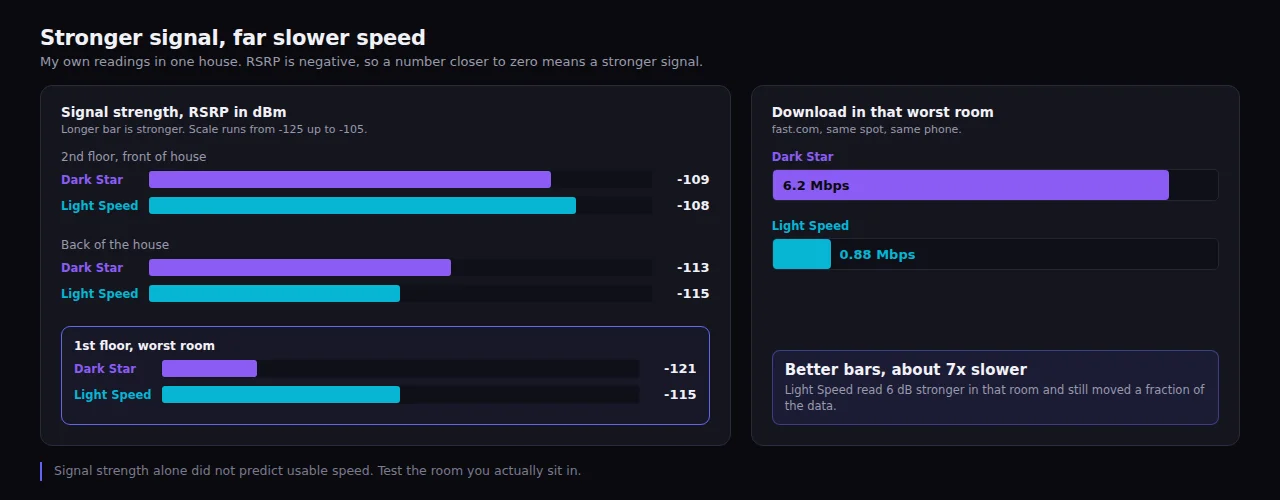
Light Speed held the stronger signal in the worst room and still delivered about a seventh of the speed.
Light Speed won the signal reading in the room that mattered, by a few dB, and then delivered roughly a seventh of the throughput. Signal strength tells you whether the phone can hear the tower. It says nothing about how much capacity that tower has left to give you.
The priority ranking cuts the same way. A better QCI number moves you up the queue at a congested tower, but the queue is still for whatever capacity that tower has, and a nearer tower with more headroom beats a better place in line at a busier one. That is the gap between my two readings in one sentence.
Dark Star had its own problem. Calls and texts worked, but inconsistently enough that I stopped trusting it for anything scheduled. A network that's fast when it connects still isn't much use if the connection is a coin flip.
I don't have upload or latency figures, and I didn't time any of the switches. Those are the measurements I'd want next time.
What It Costs
The switch networks page lays out the pricing plainly. Transfers are first 2 free, then $2 per transfer after that. They're also free on Unlimited Premium, which is the plan I'm on, so all of my testing cost nothing.
Unlimited Premium runs $44/mo, or $32.50/mo if you pay annually. Unlimited Starter is $25/mo, or $22.50/mo annually. Taxes and fees are already in those numbers, which is rarer than it should be. Prices verified September 2026.
Pay annually and Premium is $299 for the first year ($24.92/mo), while Starter is $199 for the first year ($16.58/mo). If you'd rather not commit to a year, US Mobile has also run a three-month promo for $45.
The other no-port option is the Multi-Network add-on. It's $10/mo per line, or $90/yr on an annual plan, and it puts up to two additional networks on the same phone with their own numbers. Handy if you want to run two networks side by side instead of switching back and forth.
Switching Networks vs Porting to a New Carrier
Porting means a new account, a new bill, a transfer window, and the risk of the port getting stuck. I've done it plenty of times and it's usually fine, but "usually" is doing work in that sentence.
Switching a network inside US Mobile skips all of it. My number carried over every time, which matches what ShopCellPlans reports, though I'll note US Mobile doesn't state it outright on its own site.
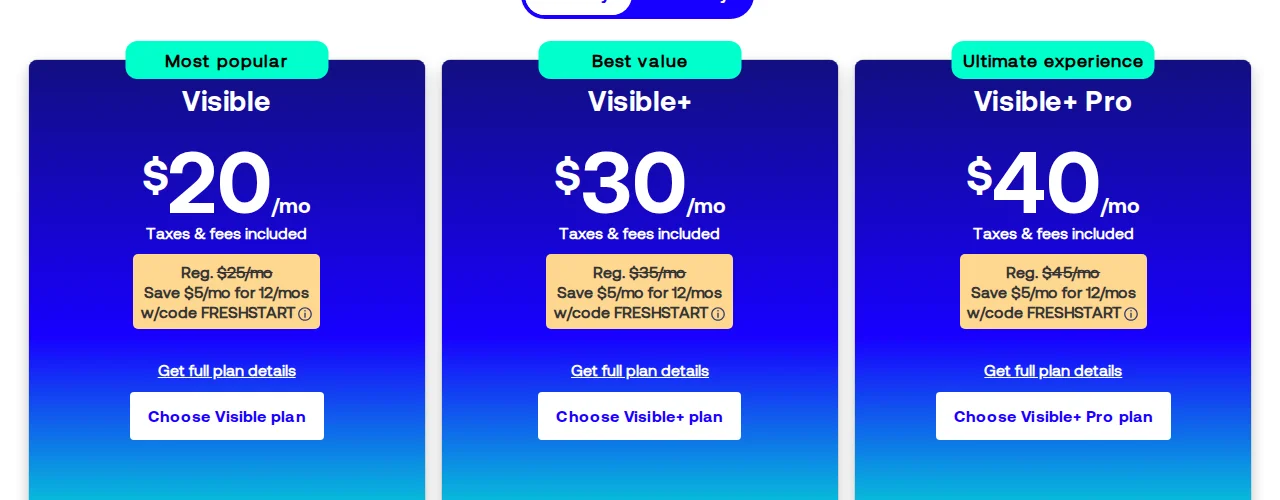
If you're weighing whole carriers rather than networks, I've written up my time on Visible and a Verizon vs AT&T coverage breakdown.
Downsides and Gotchas
A transfer can't be reversed or cancelled once it starts. If you pick wrong, you wait out the cooldown and switch again.
The rate limits are real. Switching is capped at once every 4 hours, up to 8 per 30-day cycle, which sounds generous until you're trying to A/B two networks across a weekend.
Timing estimates vary wildly. US Mobile's plans page says the switch "takes about 10 minutes." WhistleOut measured "almost two hours" in July 2026. I didn't time mine, so plan for a window where you don't need your phone.
The Free Trial Trap
US Mobile advertises a free trial, and it's the wrong tool for this job.
Per the new customer offers page, the trial requires porting your number in, which is exactly the commitment you were trying to avoid while testing. Reviews.org's walkthrough adds the second catch, that the trial locks you to a single network, Warp or Dark Star, with no Light Speed option.
So the trial can't answer the question "which of these three works at my house." Switching an existing line or the Multi-Network add-on can.
Wi-Fi Calling Is the Backstop
No network fixed my worst room completely. Wi-Fi calling did, and it works on all three US Mobile networks.
Turn it on before you start testing. Otherwise you'll credit a network for a room your router was quietly rescuing.
Who Should Do This, and Who Shouldn't
Worth it if your coverage problem is location-specific, if you've moved, or if one carrier has always been weak in your area and you'd rather test than guess. Also worth it if you want to compare networks for a family, which I covered in best MVNO plans for a family of 4.
Skip it if your current service is fine. There's no prize for optimizing a phone that already works, and the cheapest path is usually just the cheapest unlimited plans for one line.
Where I Landed
I went back to Dark Star. Living on Light Speed settled it: 880 Kbps in the worst room wasn't usable for anything past a text, and the stronger signal never turned into a better day.
Calls and texts on Dark Star are still inconsistent, so this isn't a clean win. I'm trading some call reliability for a connection that actually moves data, and at my address that's the better deal.
The third switch went exactly like the first two: same number, same plan, no port, no charge. That's the real value of Teleport. Picking the wrong network cost me some slow downloads, not a new account.
I'll re-run both tests in a few months and see whether anything moved.
Test Networks on One US Mobile Line
The $30 credit requires transferring your number in, and we both get it. Check the terms at checkout for how it interacts with any current promo. Full disclosure: this is my referral link, so I get $30 too.
Frequently Asked Questions
Does US Mobile let you switch networks for free?
US Mobile gives you first 2 free on most plans, then $2 per transfer after that. Transfers are free on Unlimited Premium, so every switch I made cost me nothing. The rules live on the switch networks help page.
Do I keep my phone number when I switch networks on US Mobile?
Mine carried over all three times I switched, and I never started a port or filled in a transfer form. US Mobile doesn't state the guarantee on its own site, though ShopCellPlans reports the same behavior. You're changing the network under an existing line rather than opening a new account, so the number stays with the line.
How long does a US Mobile network switch take?
US Mobile's plans page says a switch "takes about 10 minutes," while WhistleOut measured almost two hours in July 2026. I didn't time any of mine. Choosing eSIM keeps you in that range; a physical SIM ships in 4 to 6 business days instead.
How many times can I switch networks on US Mobile?
Switches are capped at once every 4 hours, up to 8 per 30-day cycle. Once a transfer starts it can't be reversed or cancelled, so a wrong pick means waiting out the cooldown before you can correct it.
Which US Mobile network is Verizon, AT&T, or T-Mobile?
Warp rides Verizon, Dark Star rides AT&T, and Light Speed rides T-Mobile. US Mobile never names the carriers on its own site, so the mapping comes from third parties like WhistleOut and Wikipedia.
How do I find the best carrier for my address?
Measure RSRP in the rooms you actually use, then run a speed test on top of it. Coverage maps won't answer the question, because the FCC's mobile map covers service "outdoors or in a moving vehicle, but not indoors." My own readings showed the stronger signal losing badly on speed, so one measurement alone would've sent me the wrong way.