Bottom Line Up Front: Claude Code can publish your session's work as a live page, and you can now leave comments on that page the way you'd comment on a Google Doc. Claude reads the thread and either answers in it or edits the file and republishes. If you prototype UI, or you keep pasting screenshots into Slack to ask "does this look right", this closes a loop that used to run through you. If you only ever work in a terminal alone, you can skip it.
I spent a long time treating AI coding tools as terminal tools. You type, they type back, and anything visual gets exported, screenshotted, or described badly in prose.
Artifacts broke that habit, and comments on artifacts are the part that makes them worth learning.
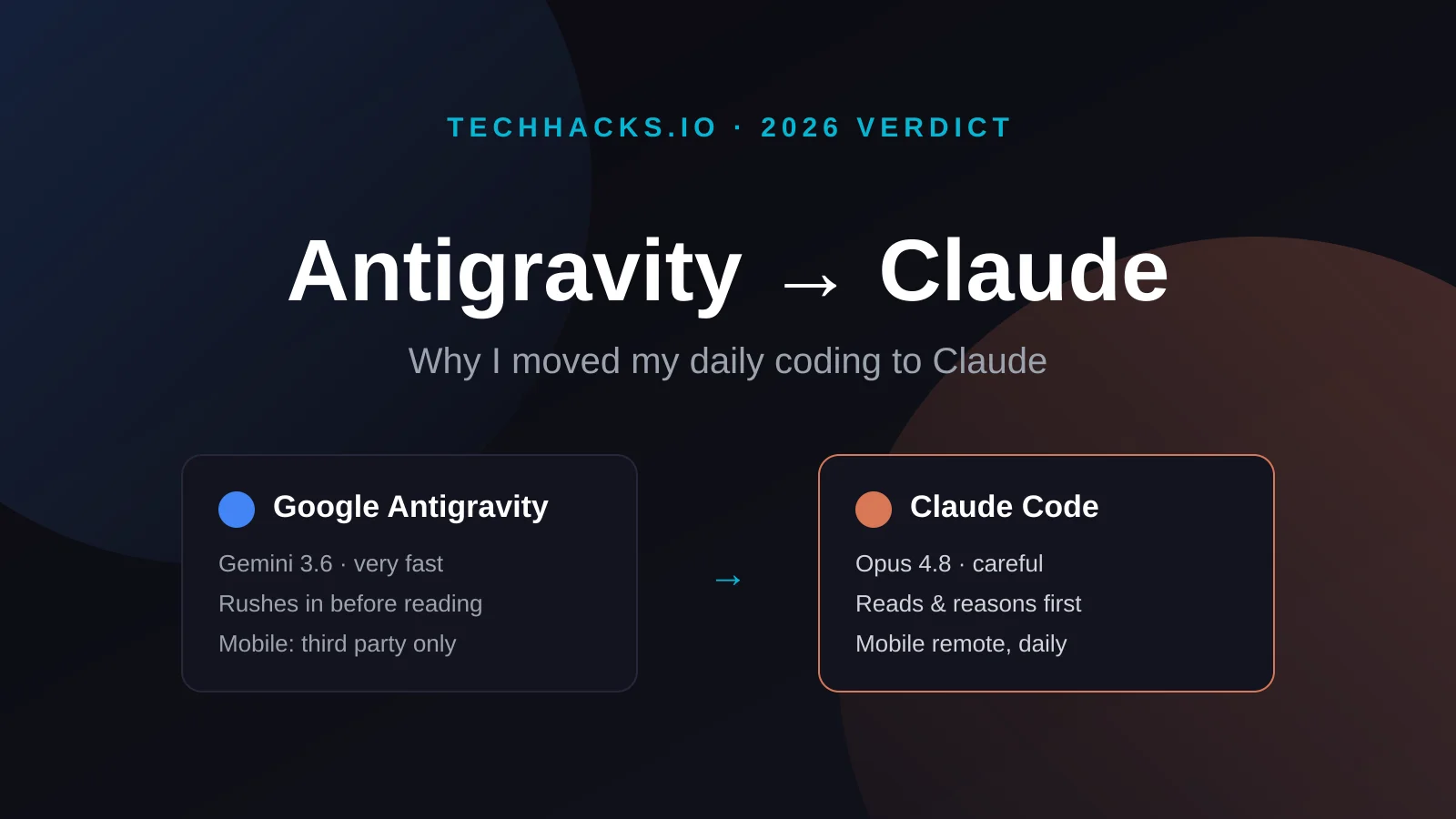
New here? The short version of how I ended up on this tool at all is in why I switched from Antigravity to Claude. This article assumes you've already got a Claude Code session running.
What an Artifact Is First
An artifact is a standalone piece of work Claude produces that you'd want to look at rather than read line by line. Anthropic's own description is content "you're likely to want to edit, iterate on, or reuse outside the conversation" (support docs). Documents, dashboards, SVG diagrams, interactive components.
Claude Code got them in June 2026. The version that matters here isn't the chat one, it's the CLI one. Claude writes an HTML or Markdown file into your project, publishes it to a private page on claude.ai, and hands you a URL that updates in place as the session keeps working.
The page is built from everything the session can reach. Your codebase, your diffs, data pulled through connected tools. So a "walk me through this PR" page can annotate the actual diff rather than paraphrase it.
Important Consideration
Artifacts are private to you until you share them. Claude Code asks permission the first time it publishes a given page, and republishing something you've already approved doesn't ask again. Press Ctrl+] to reopen the most recent one from the terminal.
Antigravity Did This First, and I Said So
Credit where it's due. Google Antigravity shipped comment-on-the-artifact before Claude Code did, and it was one of the genuinely good ideas in that product.
In Antigravity, every task produces artifacts as it runs. The launch post lists "task lists, implementation plans, walkthroughs, screenshots, and browser recordings." You leave "Google-doc-style comments" on the text ones and select-and-comment feedback on the screenshots, and that input gets "automatically incorporated into the agent's execution without requiring you to stop the agent's process."
That's a smart design, and it's the thing I missed most when I moved my daily work to Claude. Antigravity's problem was never the ideas.
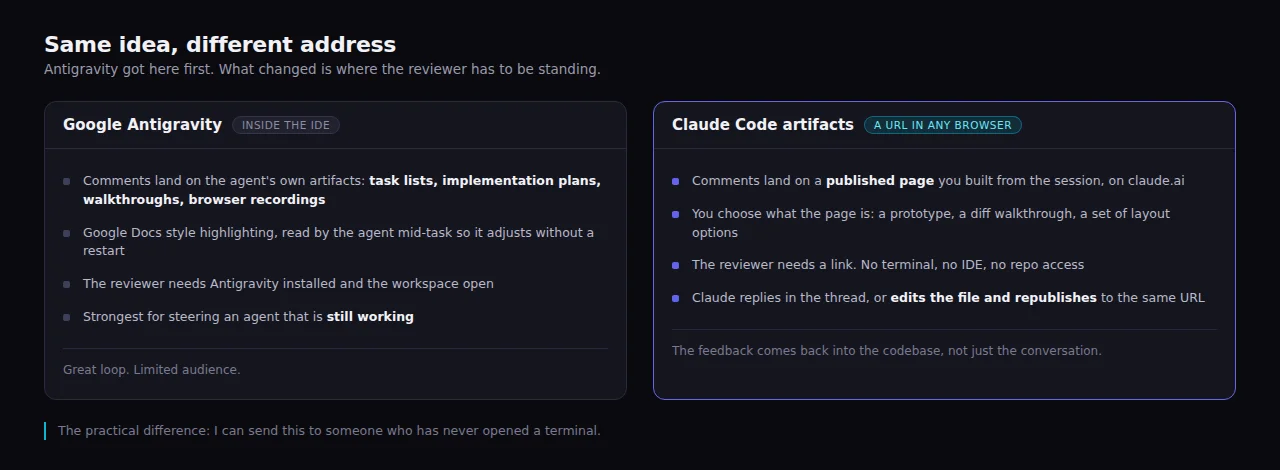
Antigravity keeps the review inside the IDE. Claude Code moves it to a link.
The difference is address. Antigravity's comments live inside Antigravity, so your reviewer needs the IDE installed and the workspace open. Claude Code's live on a URL, so your reviewer needs a browser.
That sounds like a small distinction until you try to get design feedback from someone who doesn't write code.
How the Loop Actually Works
Four steps, and only the first and last touch your terminal.
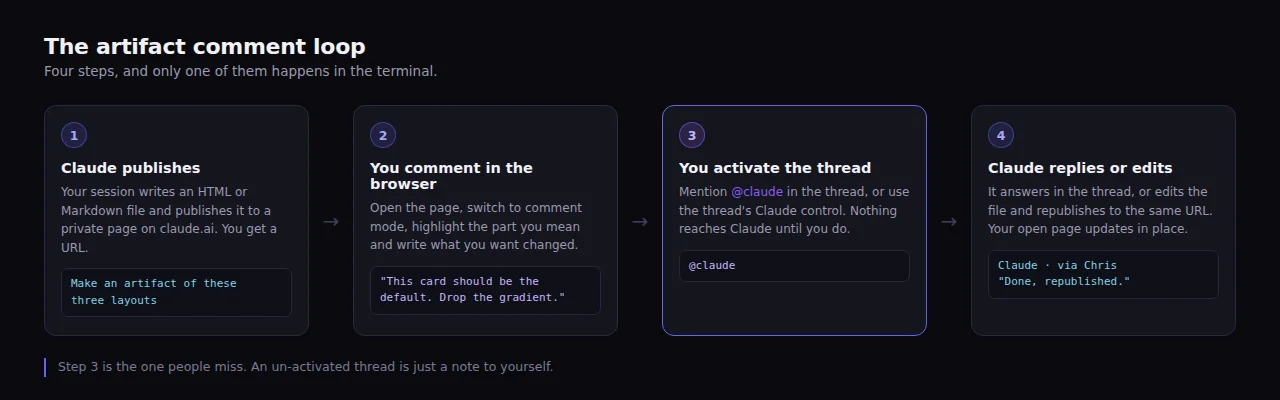
Step three is the one people skip, and skipping it makes the whole thing look broken.
1. Ask for the artifact. Describe the visual output you want in plain language. Claude decides on the file, writes it, and publishes.
Make an artifact with three layout options for the deal card.
Vary the button treatment and put a one-line tradeoff under each.
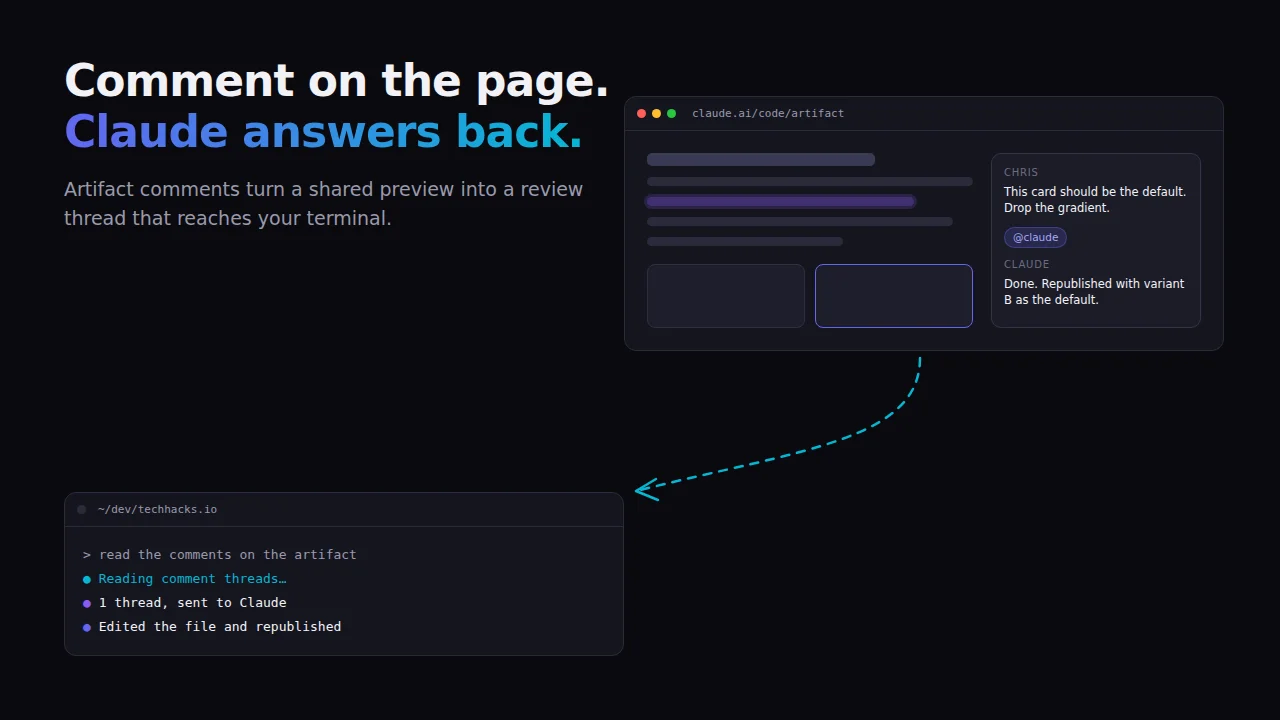
2. Open the link and comment. The page opens in your browser. Switch to comment mode, highlight the part you're talking about, and write what you want changed. Same muscle memory as commenting on a doc.
3. Activate the thread. Mention @claude in the thread, or use the thread's Claude control if the viewer shows one. Nothing reaches Claude until someone does this, which is the single most important detail in this article.
4. Claude responds. Back in your session, ask it to read the comments. It can reply into the thread, edit the underlying file and republish to the same URL, or both. Replies are attributed to Claude acting via whoever owns the artifact, so nobody's confused about who typed what. When it's finished it can resolve the thread, which is worth insisting on if you don't want a page full of open comments.
There's an undocumented flag worth knowing about. claude --watch-artifact <url> is the documented route for watching a page from your own machine, and it's a launch flag rather than something you type mid-session. It doesn't appear in claude --help, but the CLI accepts it on 2.1.237 and refuses to run it outside an interactive session, both of which I checked. What a connected watch looks like in practice I haven't confirmed, and the changelog notes watching can be unavailable, so don't build a workflow around it before testing it yourself.
Threads stay activated across republishes and renames, so you can turn one on and keep going back and forth while the page changes underneath you. Deactivating the thread or deleting it clears that.
What Happened When I Actually Ran It
I published a three-variant deal card mockup from a session on this site, kept it private, then opened the page and commented on the third card. "Make variant C the default and drop the gradient."
Two things happened faster than I expected. The session got notified without me touching the terminal, and a short acknowledgement appeared in the thread almost immediately. "On it, making variant C the default and taking the gradient out."
That acknowledgement is not the work. It's a deliberate fast reply so you're not staring at silence while the real edit happens. The actual change came after, and the page updated in place while I had it open.
The thread carried an anchor to the exact element I'd highlighted, so nothing had to guess which of the three cards I meant. That's the part that makes this better than describing a change in chat.
Important Consideration
The one genuine surprise. When I posted a follow-up confirming what changed, it was refused as a likely duplicate, because an acknowledgement already stood on that thread. I had to explicitly override to send it. Annoying for about five seconds, then obviously right, because the alternative is a thread where Claude replies twice to everything.
Replies land attributed as "Claude, via" the artifact owner, which I can now confirm rather than assert. Resolving a thread marks it resolved by Claude, and a person can reopen it.
There's still one thing no tutorial mentions. A plain comment doesn't interrupt anything. It sits on the page. If the thread hasn't been sent to Claude, the running session isn't notified and won't know it exists until you ask it to go look.
Once a thread is activated, a comment sent to Claude reaches the live session on its own, which is exactly what I saw. Before that, comments are notes to yourself.
So the default mental model isn't "Claude is watching the page." Claude checks the page when you point at it, and subscribes to threads you've explicitly opened. The --watch-artifact flag above is what turns that into actual watching.
One more that cost me a minute. If you want to update an artifact from a different session than the one that published it, you have to hand over the URL. Without it, a new session builds a brand new artifact and you end up with two pages and a confused reviewer.
Where It Actually Earns Its Keep
Prototyping is the obvious one. Ask for four versions of a settings panel on one page, send the link, and let people argue in the margins instead of in a thread where nobody can point at anything.
The comments come back as instructions, not as a summary somebody had to write for you. That saves the translation step where UI feedback usually goes wrong.
Feature development is the less obvious one. Have Claude publish an implementation plan or a checklist that updates while a long task runs, then comment on the step you disagree with before it gets built. Correcting a plan costs minutes. Correcting shipped code costs an afternoon.
Reviewing changes with non-developers is where I think it wins outright. A PR walkthrough page with the diff annotated inline, sent as a link, is a fundamentally different ask than "can you pull this branch."
Important Consideration
Comment text is treated as untrusted input by design. Claude Code fences viewer comments and selected-text excerpts as data rather than instructions, so a comment that tries to issue orders is read as text. That protection landed in 2.1.222 and matters the moment you share a page outside your team. If you care about that class of problem, I went deeper in building secure AI agents.
Why This Lives Behind the Subscription
Artifacts need Pro, Max, Team, or Enterprise, and a session signed in with /login. That's not a soft gate. Per the artifacts documentation, sessions authenticated with an API key, an LLM gateway token, or a cloud provider credential can't publish at all, and neither can sessions running through Bedrock, Vertex, or Foundry.
I've been reasonably critical of subscription pricing on this site, and I still think you should check the value comparison before committing to any of these tools. But this is the kind of feature that justifies one.
You're not paying for tokens here. You're paying for hosting, sharing, identity, and a comment system that nobody has to run.
Worth knowing before you plan around it. On Pro and Max, a public link is the only way to share an artifact, and there's no per-person access control. Team and Enterprise get organization sharing plus editor roles, and public sharing is off until an owner turns it on.
Three Honest Caveats
What I tested and what I didn't. I ran the full loop on 2.1.237: published a page, commented on it, activated the thread, and watched Claude acknowledge, edit the file, republish, reply, and resolve. What I haven't tested is a second person commenting on a page I shared with them, so anything about multiple reviewers, editor roles, or organization sharing is from the documentation rather than from use.
The docs haven't caught up. The official artifacts documentation covers publishing, updating, and sharing, and says nothing about comments. The version window shows up in a community-maintained trace of Claude Code's system prompts, where the comment reply and edit machinery lands in 2.1.221 and gets refined through 2.1.235. The same trace is where the activation and untrusted-data behavior above is described.
An artifact is a page, not an app. No backend, no routes, no form storage, and a 16 MiB ceiling on the rendered result. If you're expecting to prototype something with real persistence, you'll hit that wall fast.
Want to try it in ten minutes? Open a Claude Code session in any project and ask for an artifact of something you'd otherwise screenshot. Then open the link, highlight a line, and mention @claude in the comment.
The Takeaway
Antigravity had the right instinct and put it in the wrong place. Comments on artifacts only pay off when the person commenting doesn't need your development environment, and Claude Code got that part right by putting the page behind a link.
Learn the activation step, remember to pass the URL across sessions, and this quietly replaces a lot of screenshot-and-explain.
I'd rather point at the thing than describe it.