
The Short Version
I use Meta Muse, Meta's AI agent, to read my Rocket Money account and tell me which Amex Platinum credits I haven't used yet, while there's still time to use them. I can also just ask it money questions in plain English. It never logs in to my bank, because Muse reads Rocket Money and Rocket Money reads the banks.
If you carry a card with a pile of credits, it's worth an evening to set up. If you don't, and Rocket Money's own alerts already cover you, skip it.
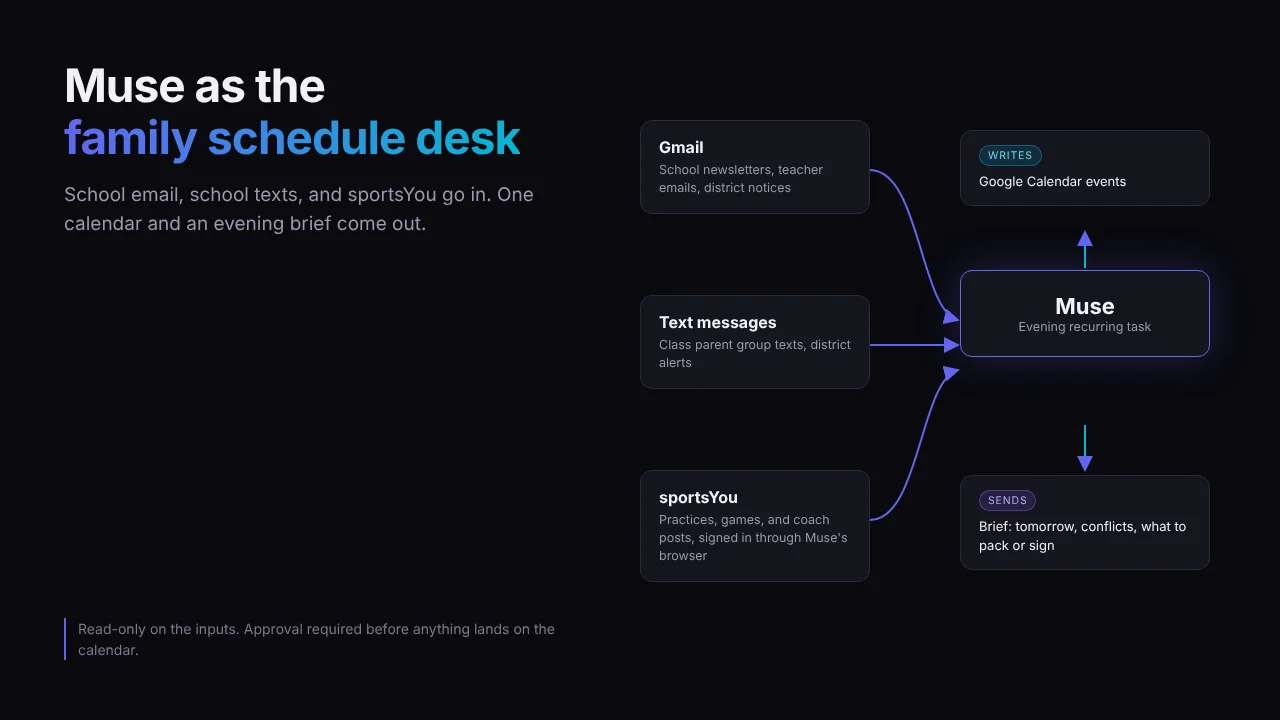
I already let Muse run my kids' school and sports calendar. Money was the obvious next job.
Rocket Money is great at collecting. It pulls every transaction from every account into one list. What it won't do is tell me "so what," like whether Amex actually paid me back for that streaming charge, or that the lululemon credit expires in nine days.
That gap is exactly what Muse fills.
What Muse Adds on Top of Rocket Money
Think of Rocket Money as the filing cabinet and Muse as the assistant who actually opens it every month. A few things make that work better than I expected.
- It knows the rules you give it. Rocket Money has no idea the Resy credit resets every quarter. Muse does once you tell it, and it checks every transaction against those rules.
- It shows up on schedule. Muse runs recurring tasks in its own cloud computer, so it keeps working after you close the app. The result lands as a message in your Muse chat (Meta's scheduling help).
- You can talk back. When a report says a credit is missing, I can ask a follow-up right there instead of digging through statements.
- It can hand off to your calendar. If Google Calendar is already connected, like mine is for the kids, Muse can propose a reminder before a credit expires and wait for your approval.
Muse also doesn't get bored reading statements, which makes one of us.
Job 1: Make the Amex Platinum Pay for Itself
The Amex Platinum has an annual fee big enough that the card only pays off if you actually use its credits. Amex spreads them across monthly, quarterly, twice-a-year, and yearly clocks, which turns the card into a coupon book with a different expiration date on every page.
Amex is betting you'll forget some of them. Muse is the friend who doesn't.
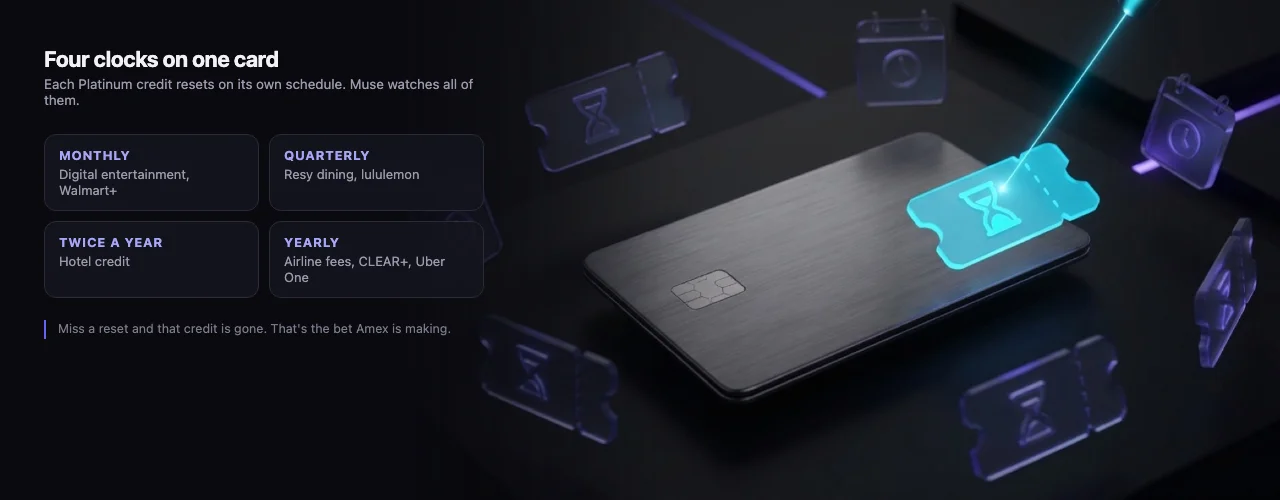
The quarterly pair is the easiest to miss, because the Q4 reset lands right in the middle of the holidays.
As of October 2026, here's what Muse can track for me through Rocket Money, per American Express:
| Credit | Cadence | What Muse looks for |
|---|---|---|
| Digital entertainment (up to $25) | Monthly | A streaming charge, then a matching credit |
| Walmart+ (up to $12.95 plus tax) | Monthly | The membership charge, then the credit |
| Resy dining (up to $100) | Quarterly | A Resy restaurant charge this quarter |
| lululemon (up to $75) | Quarterly | A lululemon charge this quarter |
| Hotel (up to $300) | Twice a year | A prepaid Fine Hotels + Resorts or Hotel Collection booking this half |
| Airline fees, CLEAR+, Uber One | Yearly | The qualifying charge, then the credit |
How the Matching Works
Every credit leaves two footprints in Rocket Money. First the purchase, then a few days later a statement credit from Amex on the same card. Muse pairs them up.
A purchase with a partner and no credit after ten days usually means you never enrolled. Several of these credits need a one-time enrollment in your Amex account, and skipping it means the credit just quietly never shows up. A mismatch in the report is how you'd notice.
No purchase at all, with the quarter almost over, is the "use it or lose it" pile. That's the section I actually act on.
Important Consideration
Uber Cash won't show up. The monthly Uber benefit loads into your Uber account rather than posting to the card, so Rocket Money never sees it. Check that one in the Uber app.
The Monthly Task
Here's the recurring task. Muse confirms it, lists it in the Upcoming tab, and runs it until you cancel it.
On the 20th of every month, open Rocket Money and review my
Amex Platinum transactions since the start of the current year.
[paste the house rules from the setup section here]

Send me three sections:
1. Use it or lose it: credits for this month, quarter, half, or
   year that I haven't triggered yet, with the deadline
2. Missing: qualifying purchases with no matching statement credit
   after 10 days (likely an enrollment problem)
3. Posted: credits that landed since the last report
I run it on the 20th because that leaves enough of the month to fix a miss. A report on the 31st just tells you what you lost.
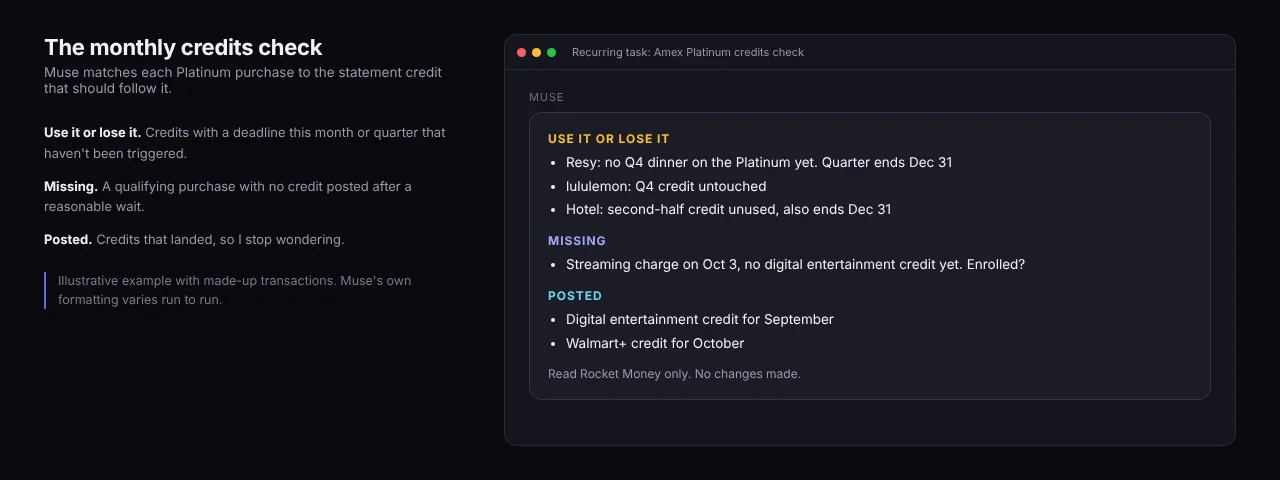
An example with made-up transactions. The Use It or Lose It section is the reason this task exists.
It's also the right season to start. The fourth-quarter Resy and lululemon credits and the second-half hotel credit all reset on December 31, which is a deadline that sneaks up on everyone, usually somewhere between Thanksgiving leftovers and the school holiday concert.
Once a year, before the annual fee posts, ask Muse to total every Platinum credit that actually landed in the last 12 months and compare it to the fee. That one number should decide whether the card stays in your wallet.
Job 2: Ask It Questions Like a Person
The scheduled report is the backbone, but asking questions whenever I want is the fun part. Rocket Money can answer most of these too, after enough tapping and filtering. Muse just answers.
Did the digital entertainment credit post for October?
Which Platinum credits have I used this year, and what's left?
How much did I spend at restaurants on the Platinum this quarter,
  and how much of that was at Resy restaurants?
What new recurring charges showed up in the last 60 days?
I ask one-offs like these in a side chat, which keeps them out of the thread where the monthly report lands. Answers are only as fresh as Rocket Money's last sync, so a charge from this morning may not be there yet.
More Jobs That Use the Same Setup
If credit card credits aren't your thing, the same read-only setup handles other money chores. These are the ones I'd hand it first.
- Subscription creep. Compare every recurring charge to last month and flag anything that went up. Streaming prices rarely go down.
- Double charges. Same merchant, same amount, within a few days of each other.
- A plain-English monthly recap. Where the money went, what changed from last month, and one thing worth a closer look.
Keep each one narrow with a clear right answer. "Watch for anything weird" sounds useful and produces mush.
The Setup: Muse Reads Rocket Money, Not Your Bank
Here's the one rule I wouldn't bend. Never give Muse, or any agent, your bank login. A bank login is the whole account, transfers and Zelle included, and sharing it usually breaks your bank's terms.
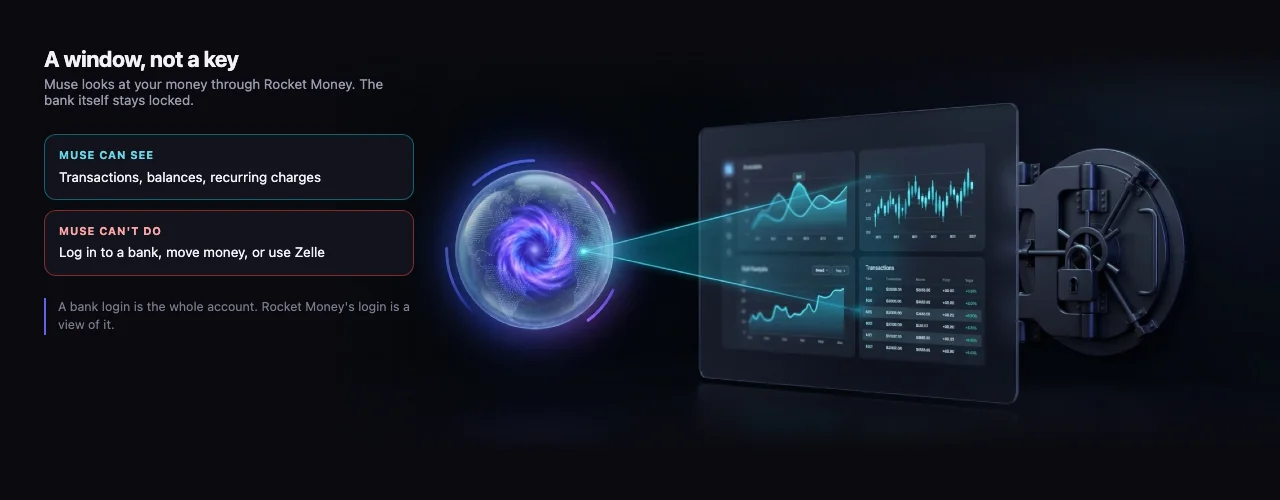
Rocket Money holds every bank connection, so the only password Muse ever touches is Rocket Money's.
Banks are noticing. On October 23, CBS News reported that Schwab has been blocking unauthorized agents and that Chase told customers they "should not give their username and passwords to anyone."
Rocket Money already holds every account connection, through Plaid, and says it never stores your bank login. So Muse gets one login to an app that can see everything, instead of a password for every bank.
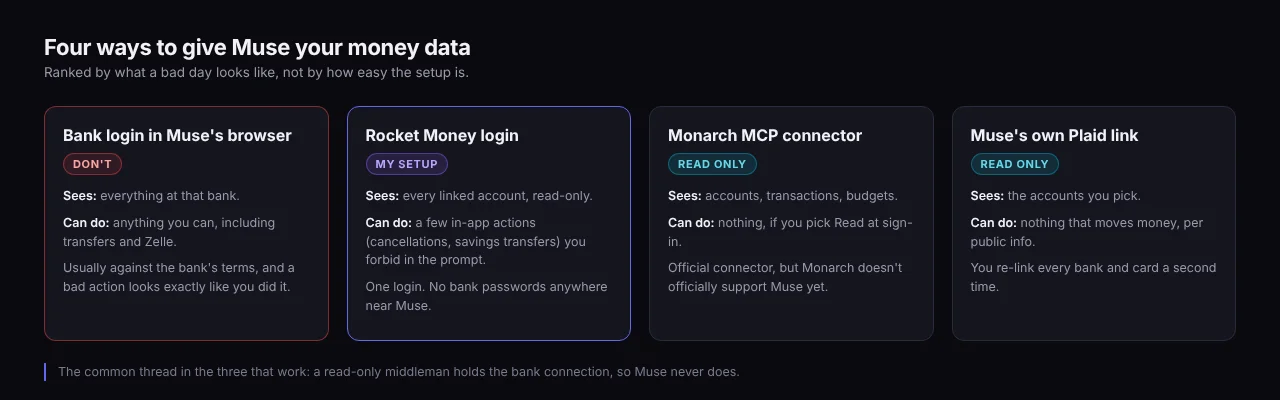
Rocket Money isn't the most locked-down option here. It's the one I already had every account linked to.
I'm on Rocket Money because I have a mortgage through Rocket, and Premium is free while Rocket services the loan (Rocket Money's terms). That perk ends if servicing moves away from Rocket, you refinance elsewhere, or the loan is paid off.
Step 1: Tighten Up Rocket Money
Use a Rocket Money password you don't use anywhere else, and turn on two-factor authentication if it isn't on already.
Also know which buttons do something. Financial Goals moves money from checking into a custodial account at Rocket Money's partner bank, and Premium can cancel subscriptions and run bill negotiation, which charges a fee when it succeeds. None of them can pay a stranger, but Muse should never press them.
Step 2: Log In to Rocket Money Inside Muse's Browser
Rocket Money has no official AI connector, though its feedback board is full of requests for one. So I ask Muse to open app.rocketmoney.com in its own browser, the same way I handled sportsYou for the calendar, and type the login and two-factor code in myself.
In the app, saved logins land in the Secure credentials store under Settings, where you can see or delete them. Expect to log in again now and then when the session expires.
Step 3: Paste the House Rules
I put these at the top of every money task, so they travel with the job instead of living in a chat from three weeks ago.
Rules for Rocket Money:
- Read only. Look at transactions, balances, and recurring charges.
- Never click cancel, negotiate, transfer, or anything in Financial
  Goals. Never change settings, categories, or linked accounts.
- If a page asks you to confirm, pay, or sign in to a bank, stop and
  tell me instead.
- Never log in to a bank, card issuer, or brokerage site directly.
- If you can't get into Rocket Money, say so at the top of the report.
That last line matters more than it looks. A report that says "nothing to flag" because the session quietly expired is worse than no report, because I'd believe it.
Not on Rocket Money?
- Monarch relaunched an official connector on October 21 with a Read permission option. Add
https://api.monarch.com/mcpunder Settings, then Connectors, then Add custom connector in Muse. Monarch doesn't officially support Muse yet, and I haven't tested it. - Muse's own Plaid link connects your accounts to Muse directly, read-only (Plaid). I haven't used it, since it means linking every bank and card a second time when Rocket Money already has them all.
- Mint is gone. Intuit shut it down on March 23, 2024.
Three Settings to Check First
- Turn off training. Meta uses eligible interaction data to train its models by default (The Neuron). Opt out in Muse's settings before your transactions start flowing through it.
- Don't share money chats. Shared Muse chats turned out to be discoverable by third parties this month, and Meta suspended the feature.
- Treat merchant names as untrusted text. Meta acknowledges that "prompt injection remains unresolved", and whoever charged you wrote that transaction description. Read-only access plus the house rules keeps a weird merchant name from turning into an action.
The longer version of why read-only defaults matter is in building secure AI agents.
What It Costs
Rocket Money has a free tier, and Premium is a pay-what-you-want subscription. Mine's free through the mortgage, which is the main reason I'm on it rather than Monarch.
Muse has a free tier plus paid Power and Maximum plans, and signup asks for a payment card even on free (launch coverage). A once-a-month credits check is about as light as a recurring task gets, so I'd start on free.
Let Muse chase your card credits
Start with one narrow job, like the monthly credits check, and a Rocket Money login instead of a bank login. Add questions and new jobs once a few reports have matched your statements.
Use my referral code LUYLLR. Redeem it in Muse's Settings within 48 hours of joining and we both get 1 billion Muse tokens. Full disclosure, that's my personal referral, so I get the tokens too.
Frequently Asked Questions
Can Meta Muse track my Amex Platinum credits?
Yes, if it can read your transactions. Muse reads Rocket Money (or another aggregator), pairs each qualifying purchase with the statement credit that should follow, and reports unused and missing credits on a schedule. Uber Cash is the exception, since it loads into your Uber account instead of posting to the card.
Does Meta Muse have a Rocket Money connector?
As of October 2026, Rocket Money has no official AI connector for Muse or any other assistant. You can log in to the Rocket Money website inside Muse's own browser and tell it to only read. Avoid community connectors that ask you to paste your Rocket Money session cookie.
Is it safe to give Meta Muse my bank login?
No, because a bank login lets the agent do anything you can, including moving money, and sharing it usually violates your bank's terms. Chase has told customers not to give their username and password to anyone, and Schwab says it has been blocking unauthorized agents. Connect a read-only aggregator or Muse's Plaid link instead.
Can Muse connect to Monarch Money?
Monarch's official MCP connector at api.monarch.com/mcp, which has a read-only option, should work as a Muse custom connector. I haven't tested it, and Monarch officially supports Claude, ChatGPT, Gemini CLI, and Cursor, not Muse, so treat it as unsupported.
What happened to Mint?
Intuit shut Mint down on March 23, 2024, and moved users to Credit Karma. Credit Karma tracks accounts and net worth but dropped Mint's budgets, so most former Mint users moved to Rocket Money, Monarch, or similar apps.
The Takeaway
Rocket Money tells you what happened. Muse tells you what to do about it, on a schedule, and answers when you ask. Together they're the closest thing I've found to a personal assistant for the money side of life.
Keep the bank passwords to yourself, give Muse one job with a deadline, and let it nag you about the lululemon credit so you don't have to remember it.